


Understanding how your business is performing shouldn’t mean piecing together numbers from three different reports just to answer a simple question. You want to know what came in, what went out, and how each part of your business is contributing, without the digging.
That’s where the new Financial Dashboard comes in. You’ll find it under Reports > Financial, and it pulls your payments, offer revenue, and gift card activity into one high-level view for any date range you choose, so you can see the big picture first and drill into the details only when you need to.
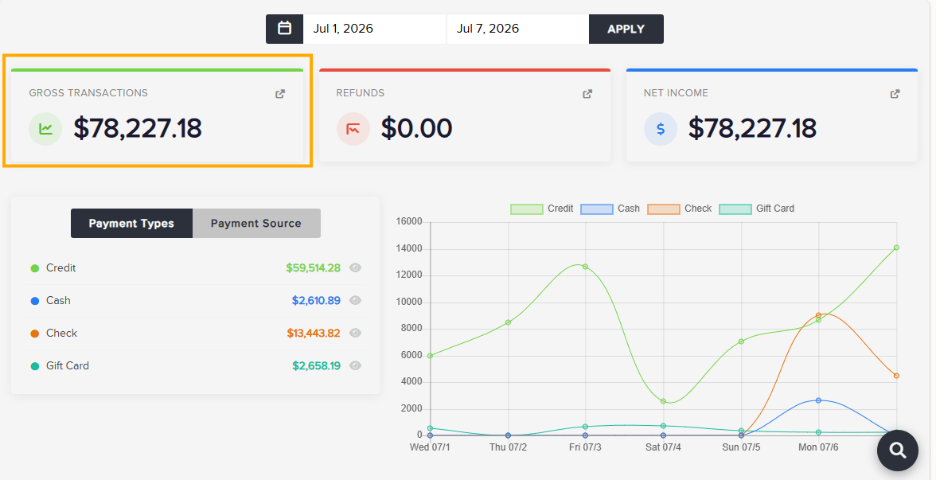
Transactions, At a Glance
At the top of the dashboard, you’ll find the three numbers that matter most day to day:
- Gross Transactions – total payments received in the date range
- Refunds – total refunded in the date range
- Net Income – Gross Transactions minus Refunds
From there, Payments by Type and Payments by Source break those same payments down by how guests paid (credit, cash, gift card, and so on) and where the payment came from (Front End, Back Office, Client Terminal, etc.). Every one of these figures ties back to the Revenue and Transaction Report, so if a number looks off, you’re never far from the transaction-level detail.
Revenue by Offering
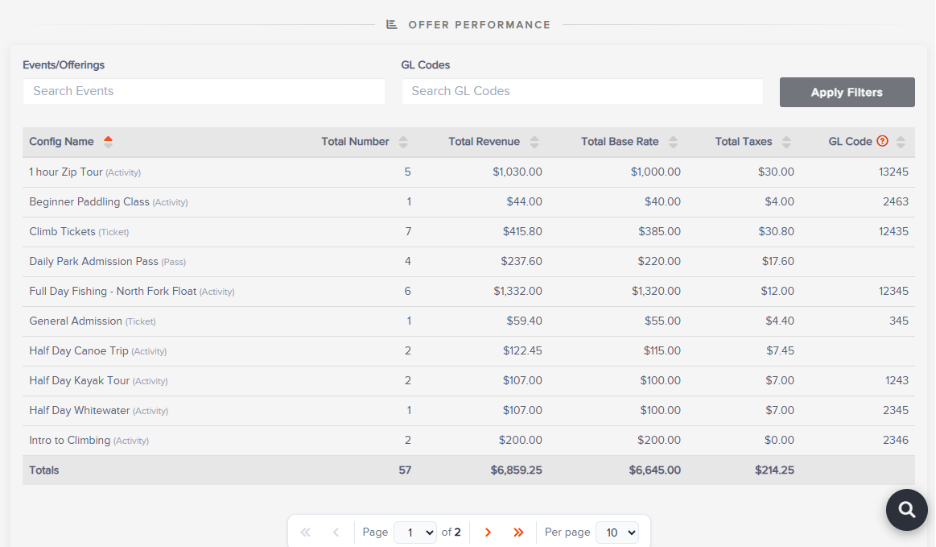
Below Transactions, Offer Performance shows revenue broken out by Activities, Tickets, Rentals, Passes, Lodging, Packages, and Gift Certificates.
This section works a little differently than the numbers above it: it’s based on invoiced revenue and when the offering actually occurs, not when the guest pays. A trip booked and paid for in June but taking place in July shows up in July’s numbers, no matter how or when it was paid for.
Filter by specific events/offerings, by GL Codes if you use the Accounting Center, or both. Each row shows Total Number, Total Revenue, Total Base Rate, and Total Taxes for that offering.
Gift Card & Gift Certificate Activity
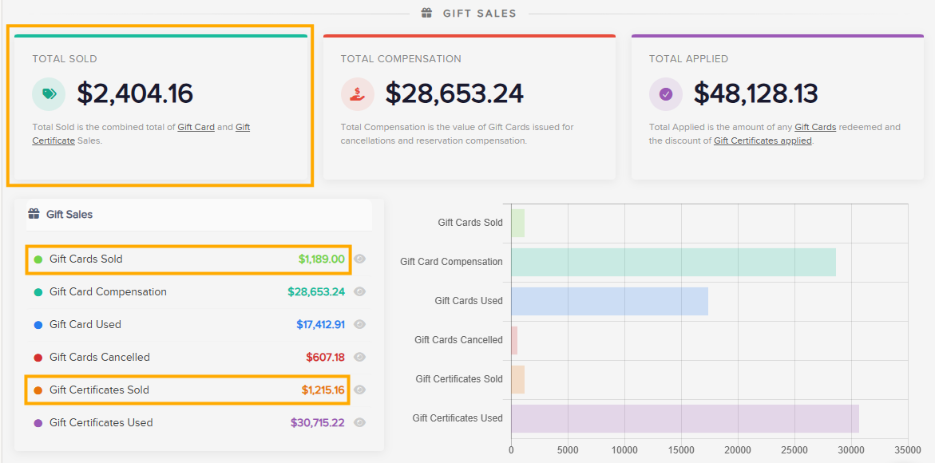
The Gift Sales section rounds things out with a summary of what was sold, what was issued as compensation, and what was redeemed, along with a full breakdown of each. Gift certificates and gift cards behave a little differently under the hood (a gift certificate’s discount can be applied more than once, for instance), so we’ve kept dedicated reports behind each figure to make tracing any number back to its source painless.
One Thing to Note
Every major number on the dashboard links back to the report behind it, so reconciling or finding transaction-level detail is never more than a click away. The one exception is credit card processing fees, which aren’t reflected on the dashboard; for those, use the applicable Financial Report.
Why This Update Matters
Instead of jumping between reports to answer basic questions about how your business is doing, you now have one place to start. The Financial Dashboard gives you the answer at a glance, and a clear path to the details whenever you need to go deeper.
We hope it makes it a little easier to stay on top of your numbers, every day.